> ## Documentation Index
> Fetch the complete documentation index at: https://docs.codemod.com/llms.txt
> Use this file to discover all available pages before exploring further.
# Insights
In large, evolving codebases, migrations, API transitions, and security anti-patterns often go unnoticed.
Codemod Insights helps you turn repository data into dashboards that show migration progress, API adoption, dependency exposure, and other codebase signals over time.
## How insights work
When you run migrations across many repositories and teams, you need visibility into what changed, what is left, and who owns the remaining work. Insights gives you that visibility through a few reusable building blocks:
* **[Dashboards](#dashboards)** group related widgets around a migration, initiative, or team.
* **[Widgets](#widgets)** show query results as timeseries charts, single numbers, tables, or notes.
* **[Queries](#queries)** pull data from repositories using JSSG codemods, ast-grep YAML rules, or indexed dependency data.
* **[Template variables](#template-variables)** let you reuse the same dashboard with different repositories, rules, JSSG sources, or string inputs.
## Dashboards
Dashboards are the top-level container for your insights. Use them to organize widgets by initiative, for example an `i18n migration` dashboard that tracks old API usage, new API adoption, and files remaining across affected repositories.
To create a new dashboard, go to `Insights → Create Dashboard`.
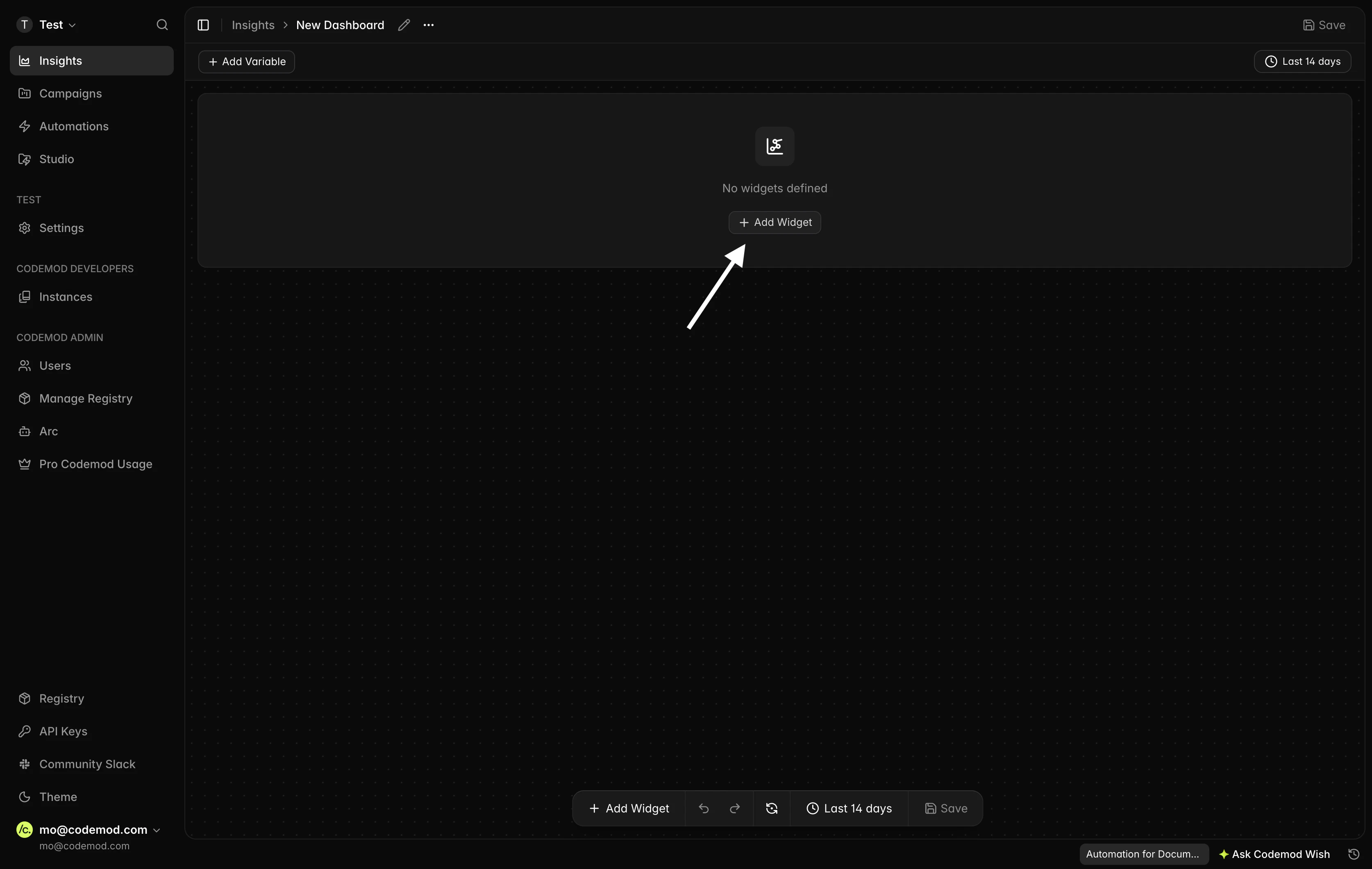 For an AI-native experience, try using Codemod Wish while viewing a dashboard. You can ask for new widgets, changes to existing widgets, or explanations of the data.
## Widgets
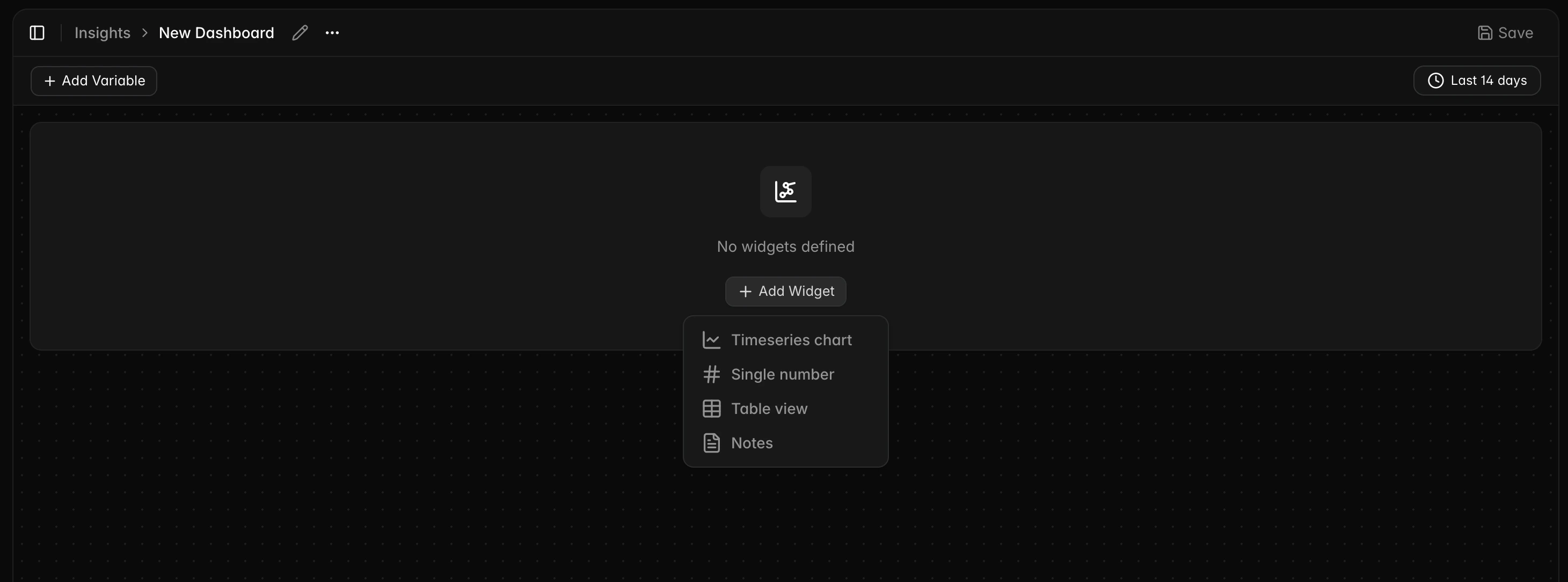
Widgets are the building blocks of a dashboard. Insights supports four widget types:
* **Timeseries chart** - track how a metric changes over time, such as deprecated API calls trending down week over week.
* **Single number** - show a point-in-time value, such as total files still using an old pattern.
* **Table view** - show breakdowns with sorting and row limits, such as remaining work by repository or codeowner.
* **Notes** - add Markdown context, caveats, interpretation, or next actions.
Timeseries chart, single number, and table view widgets are query-backed. They run one or more queries against your repositories and render the results in the selected format. Notes widgets do not run queries.
For an AI-native experience, try using Codemod Wish while viewing a dashboard. You can ask for new widgets, changes to existing widgets, or explanations of the data.
## Widgets
Widgets are the building blocks of a dashboard. Insights supports four widget types:
* **Timeseries chart** - track how a metric changes over time, such as deprecated API calls trending down week over week.
* **Single number** - show a point-in-time value, such as total files still using an old pattern.
* **Table view** - show breakdowns with sorting and row limits, such as remaining work by repository or codeowner.
* **Notes** - add Markdown context, caveats, interpretation, or next actions.
Timeseries chart, single number, and table view widgets are query-backed. They run one or more queries against your repositories and render the results in the selected format. Notes widgets do not run queries.
 Each query-backed widget can contain up to 10 queries. Use the query source selector to choose the data source for each query:
* **JSSG Codemod** - runs inline JSSG source, a JSSG codemod package, or a JSSG source template variable.
* **ast-grep (YAML)** - runs an ast-grep YAML rule against selected repositories.
* **Dependencies** - queries indexed dependency data from selected repositories.
You can select the query source from the dropdown at the start of each query.
Each query-backed widget can contain up to 10 queries. Use the query source selector to choose the data source for each query:
* **JSSG Codemod** - runs inline JSSG source, a JSSG codemod package, or a JSSG source template variable.
* **ast-grep (YAML)** - runs an ast-grep YAML rule against selected repositories.
* **Dependencies** - queries indexed dependency data from selected repositories.
You can select the query source from the dropdown at the start of each query.
 ### Formulas
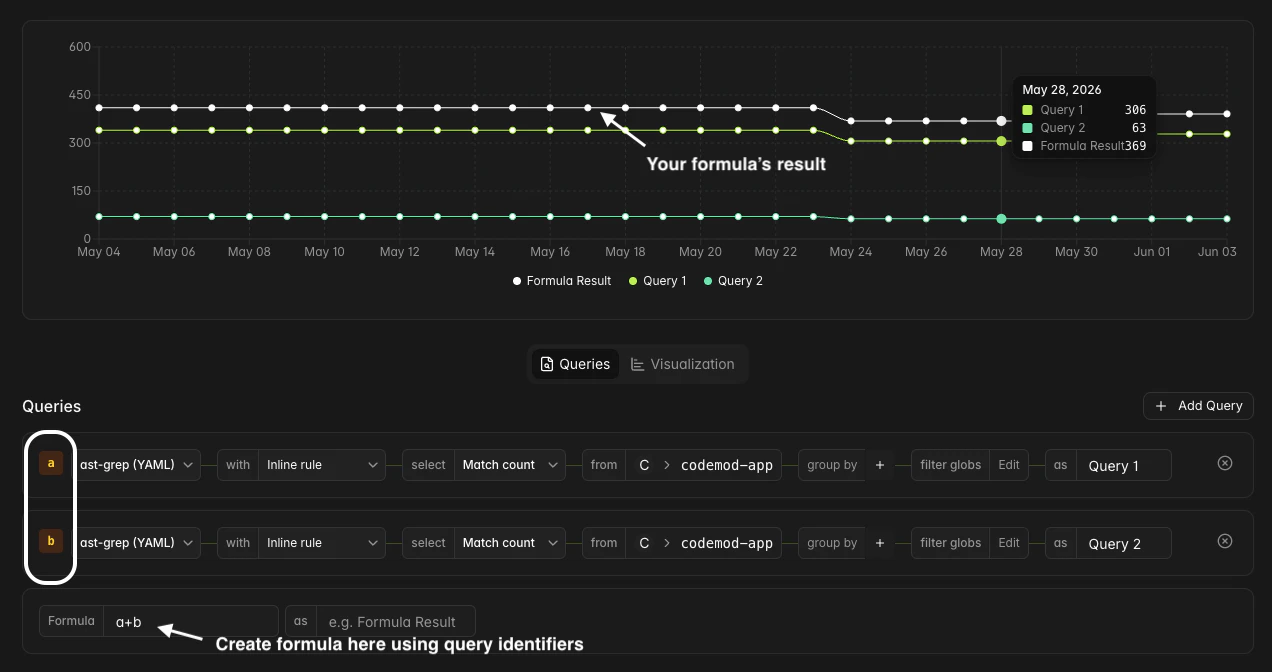
You can combine multiple query results with a formula. Queries are assigned alphabetical variable names (`a`, `b`, `c`, ...) that you can reference in the formula expression.
You can also give the formula result a name using the formula alias field (e.g. `Formula Result`).
### Formulas
You can combine multiple query results with a formula. Queries are assigned alphabetical variable names (`a`, `b`, `c`, ...) that you can reference in the formula expression.
You can also give the formula result a name using the formula alias field (e.g. `Formula Result`).
 ### Visualization settings
Each query-backed widget has visualization options in the **Visualization** tab:
* **Timeseries chart** - choose `Line`, `Bar`, or `Area`, set a Y-axis label, and choose whether to stack series or show dots.
* **Single number** - set a prefix, suffix, and number format.
* **Table view** - configure sorting, row limits, and number formatting.
### Time range
Timeseries widgets include a time range selector that controls the analysis window. You can inherit the dashboard default or set a widget-specific range.
The time range picker supports:
* **Quick ranges** - last 7, 14, 30, 60, or 90 days, and last 4, 8, or 12 weeks.
* **Absolute ranges** - a start and end date, entered manually or selected from the calendar.
* **Now expressions** - values such as `now-30d`, `now-4w`, and `now`.
## Queries
### JSSG codemod queries
JSSG codemod queries use [JSSG](/jssg/intro) for static analysis and custom metrics. Use them when you need programmatic logic, package-backed metrics, semantic analysis, or dimensions beyond a simple syntax match.
The JSSG source can come from:
* **Inline source** - write JSSG code directly in the editor.
* **A codemod package** - select an existing JSSG codemod package from [Codemod Registry](/platform/registry).
* **A template variable** - reuse a JSSG source defined at the dashboard level.
| Configuration | Description |
| --------------------- | ----------------------------------------------------------------------------------------------------------- |
| **Source** | Inline JSSG source, a JSSG codemod package, or a JSSG source template variable |
| **Semantic mode** | `Auto`, `Workspace`, or `File only` for supported JSSG sources |
| **Select** | `File count` or `Metric` |
| **Metric** | A named metric emitted by the JSSG source, with suggestions when Insights can extract them |
| **Repository** | One or more repositories, or a repository template variable |
| **Group by** | `repository`, `codeowner`, or metric cardinality keys |
| **Dimension filters** | Filter metric results by cardinality key-value pairs with equals, not-equals, or regex operators |
| **File path filter** | Include or exclude files using glob patterns |
| **Snapshot base** | A specific date or commit hash to analyze at a point in time, available for single number and table widgets |
| **Query alias** | A label for the query result, available for timeseries and table widgets |
When a JSSG metric includes cardinality keys, table widgets can use those keys to break down results by the dimension that matters to the migration, such as component name, API name, package, or risk category.
### ast-grep YAML queries
ast-grep YAML queries use [ast-grep YAML rules](https://ast-grep.github.io/reference/yaml.html) to match code patterns. Use them for syntax-level counts that do not need custom JSSG logic.
You can generate ast-grep rules with the help of AI [using Codemod Studio](/platform/codemod-studio#use-codemod-ai).
| Configuration | Description |
| -------------------- | ----------------------------------------------------------------------------------------------------------- |
| **Rule** | An ast-grep YAML rule, or a rule template variable |
| **Select** | `Match count` or `File count` |
| **Repository** | One or more repositories, or a repository template variable |
| **Group by** | `repository` and/or `codeowner` |
| **File path filter** | Include or exclude files using glob patterns |
| **Snapshot base** | A specific date or commit hash to analyze at a point in time, available for single number and table widgets |
| **Query alias** | A label for the query result, available for timeseries and table widgets |
### Dependency queries
Dependency queries use indexed dependency data from selected repositories. Use them to track package adoption, vulnerable package exposure, or dependency drift across teams.
| Configuration | Description |
| ----------------- | ----------------------------------------------------------------------------------------------------------- |
| **Ecosystem** | Filter to `npm`, `PyPI`, `Cargo`, `Go`, or `RubyGems` |
| **Package** | Filter by package name |
| **Version** | Filter by a semver range, such as `^16.0.0`, `>=16.0.0`, or an exact version |
| **Depth** | Filter to direct, transitive, or all dependencies |
| **Select** | `Dep count` or `Unique pkgs` |
| **Repository** | One or more repositories, or a repository template variable |
| **Group by** | `ecosystem`, `package`, `version`, `lock file`, `repository`, `workspace`, or `parent pkg` |
| **Snapshot base** | A specific date or commit hash to analyze at a point in time, available for single number and table widgets |
## Template variables
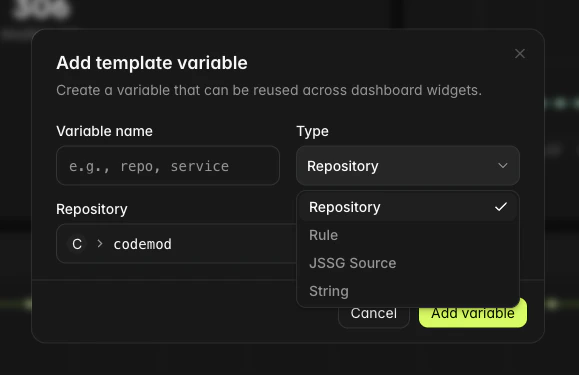
Template variables let you parameterize a dashboard so the same widgets can be reused with different inputs. For example, you can define a repository variable and use it across all widgets, then switch the selected repositories from one place.
To add a template variable, click **Add variable** at the top of your dashboard.
### Visualization settings
Each query-backed widget has visualization options in the **Visualization** tab:
* **Timeseries chart** - choose `Line`, `Bar`, or `Area`, set a Y-axis label, and choose whether to stack series or show dots.
* **Single number** - set a prefix, suffix, and number format.
* **Table view** - configure sorting, row limits, and number formatting.
### Time range
Timeseries widgets include a time range selector that controls the analysis window. You can inherit the dashboard default or set a widget-specific range.
The time range picker supports:
* **Quick ranges** - last 7, 14, 30, 60, or 90 days, and last 4, 8, or 12 weeks.
* **Absolute ranges** - a start and end date, entered manually or selected from the calendar.
* **Now expressions** - values such as `now-30d`, `now-4w`, and `now`.
## Queries
### JSSG codemod queries
JSSG codemod queries use [JSSG](/jssg/intro) for static analysis and custom metrics. Use them when you need programmatic logic, package-backed metrics, semantic analysis, or dimensions beyond a simple syntax match.
The JSSG source can come from:
* **Inline source** - write JSSG code directly in the editor.
* **A codemod package** - select an existing JSSG codemod package from [Codemod Registry](/platform/registry).
* **A template variable** - reuse a JSSG source defined at the dashboard level.
| Configuration | Description |
| --------------------- | ----------------------------------------------------------------------------------------------------------- |
| **Source** | Inline JSSG source, a JSSG codemod package, or a JSSG source template variable |
| **Semantic mode** | `Auto`, `Workspace`, or `File only` for supported JSSG sources |
| **Select** | `File count` or `Metric` |
| **Metric** | A named metric emitted by the JSSG source, with suggestions when Insights can extract them |
| **Repository** | One or more repositories, or a repository template variable |
| **Group by** | `repository`, `codeowner`, or metric cardinality keys |
| **Dimension filters** | Filter metric results by cardinality key-value pairs with equals, not-equals, or regex operators |
| **File path filter** | Include or exclude files using glob patterns |
| **Snapshot base** | A specific date or commit hash to analyze at a point in time, available for single number and table widgets |
| **Query alias** | A label for the query result, available for timeseries and table widgets |
When a JSSG metric includes cardinality keys, table widgets can use those keys to break down results by the dimension that matters to the migration, such as component name, API name, package, or risk category.
### ast-grep YAML queries
ast-grep YAML queries use [ast-grep YAML rules](https://ast-grep.github.io/reference/yaml.html) to match code patterns. Use them for syntax-level counts that do not need custom JSSG logic.
You can generate ast-grep rules with the help of AI [using Codemod Studio](/platform/codemod-studio#use-codemod-ai).
| Configuration | Description |
| -------------------- | ----------------------------------------------------------------------------------------------------------- |
| **Rule** | An ast-grep YAML rule, or a rule template variable |
| **Select** | `Match count` or `File count` |
| **Repository** | One or more repositories, or a repository template variable |
| **Group by** | `repository` and/or `codeowner` |
| **File path filter** | Include or exclude files using glob patterns |
| **Snapshot base** | A specific date or commit hash to analyze at a point in time, available for single number and table widgets |
| **Query alias** | A label for the query result, available for timeseries and table widgets |
### Dependency queries
Dependency queries use indexed dependency data from selected repositories. Use them to track package adoption, vulnerable package exposure, or dependency drift across teams.
| Configuration | Description |
| ----------------- | ----------------------------------------------------------------------------------------------------------- |
| **Ecosystem** | Filter to `npm`, `PyPI`, `Cargo`, `Go`, or `RubyGems` |
| **Package** | Filter by package name |
| **Version** | Filter by a semver range, such as `^16.0.0`, `>=16.0.0`, or an exact version |
| **Depth** | Filter to direct, transitive, or all dependencies |
| **Select** | `Dep count` or `Unique pkgs` |
| **Repository** | One or more repositories, or a repository template variable |
| **Group by** | `ecosystem`, `package`, `version`, `lock file`, `repository`, `workspace`, or `parent pkg` |
| **Snapshot base** | A specific date or commit hash to analyze at a point in time, available for single number and table widgets |
## Template variables
Template variables let you parameterize a dashboard so the same widgets can be reused with different inputs. For example, you can define a repository variable and use it across all widgets, then switch the selected repositories from one place.
To add a template variable, click **Add variable** at the top of your dashboard.
 ### Variable types
| Type | Description |
| --------------- | ---------------------------------------------------------------------------------------------------------------------------------- |
| **Repository** | Select one or more repositories. Repository selectors support up to 10 repositories by default. |
| **Rule** | Define an ast-grep YAML rule that can be reused across multiple widgets. |
| **JSSG Source** | Define JSSG source that can be reused across multiple widgets. |
| **String** | Define a text value, optionally with a fixed set of dropdown options. Use string variables for dimension filters or group-by keys. |
### Use template variables
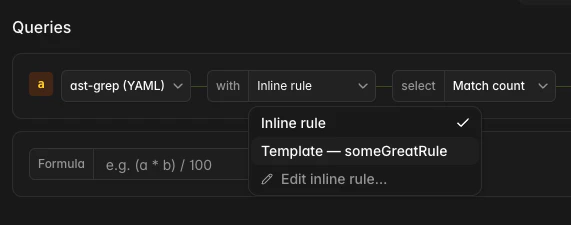
Once created, template variables appear as selectable options in query configuration fields. When configuring a query's repository, rule, or JSSG source, you can choose between specifying a value directly or referencing a template variable.
### Variable types
| Type | Description |
| --------------- | ---------------------------------------------------------------------------------------------------------------------------------- |
| **Repository** | Select one or more repositories. Repository selectors support up to 10 repositories by default. |
| **Rule** | Define an ast-grep YAML rule that can be reused across multiple widgets. |
| **JSSG Source** | Define JSSG source that can be reused across multiple widgets. |
| **String** | Define a text value, optionally with a fixed set of dropdown options. Use string variables for dimension filters or group-by keys. |
### Use template variables
Once created, template variables appear as selectable options in query configuration fields. When configuring a query's repository, rule, or JSSG source, you can choose between specifying a value directly or referencing a template variable.
 String variables can be referenced in group-by and dimension filter fields with the `$variableName` syntax.
Variables can be edited from the dashboard view. Widgets that reference a variable refresh with the updated value.
Template variables are especially useful for dashboards you reuse across repositories, teams, or migration phases.
## Next steps
Build your first JSSG codemod.
Generate ast-grep rules with the help of AI.
Run codemod packages at scale across your repositories.
Discover and publish reusable codemods.
String variables can be referenced in group-by and dimension filter fields with the `$variableName` syntax.
Variables can be edited from the dashboard view. Widgets that reference a variable refresh with the updated value.
Template variables are especially useful for dashboards you reuse across repositories, teams, or migration phases.
## Next steps
Build your first JSSG codemod.
Generate ast-grep rules with the help of AI.
Run codemod packages at scale across your repositories.
Discover and publish reusable codemods.